ART UPLOAD: A link to upload your artwork is provided at the end of the Order Processing.

Custom Desk Calendars

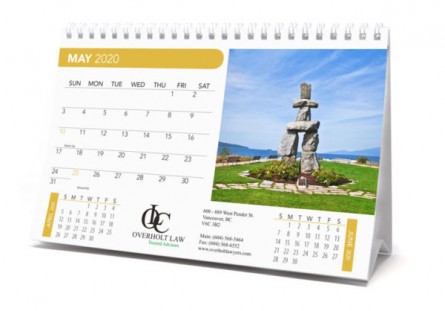
Custom Desk Tent Calendar size 8.5x5.5, Two Side Imprint, Spiral

Item No. : BKP-950
  • Product Dimension : 8.5" x 5.5"
  • Imprint Area : 8.5" x 5.5" for full custom; 3.875" x 3.625" Picture area; 3" x 1.125" Stock Ad Area only.
  • Set Up : $ 120.00

Pricing

Quantity 100 250 500 1000 2500
Pricing US $ 5.72 5.46 5.25 5.04 4.62
  • Enter desired quantity
  • x
  • =

  • **NOTE :
    Unit Price Includes: Imprint on one side only. For second side imprint add $ 0.80 for BLACK and $ 1.50 for Full Color.
  • Production Time :
    10 - 15 Business days Production Time may flactuate based on work load and time of year.
  • Item No. :
    BKP-950
  • Product Dimension :
    8.5" x 5.5"
  • Imprint Area :
    8.5" x 5.5" for full custom; 3.875" x 3.625" Picture area; 3" x 1.125" Stock Ad Area only.
  • Computer Video simulations displayed may not exactly match PANTONE-identified color standards. Use current PANTONE Color Publications for most accurate color.

  • Material :
    Paper 100# Coated Text. Other options available. Contact us.
  • Imprint Method :
    Digital
  • Proofs :
    Emailed proof Free; Paper proof $ 30.00
  • Packaging Options :
    Bubble envelope $ 0.90 each
  • Features :
    Metal Twin-loop binding - Full Color Print - Custom Calendar
  • Tags :
    Custom Desk Tent Calendar, Custom calendar 8.5x5.5, Tent Desk Calendar Custom
  • Shipping Info. :
  • Description :

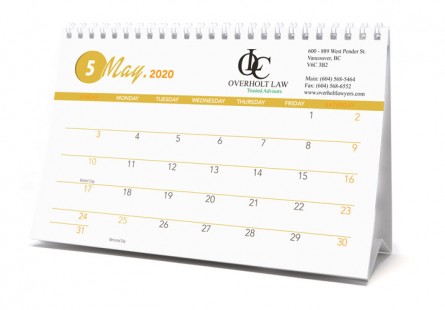
    Custom tent-style desk calendar (8.5” x 5.5”). Calendar unit price includes 12 sheets imprinted on one side with your own images plus ad copy on bottom of page. Stock calendar grid will be used unless you provide you full custom layout. Also included imprint on outside front cover.
    Product has Metal twin-loop bindingnd and calendar grid includes U.S. or Canadian holidays.
    Price Includes: Imprint on one side only. One calendar style, 12 full color pictures supplied by customer and 1 cover design; Factory supplied date grids & layout.
    • Size is 8.5" x 5.5".
    • Ad Imprint Area is 3" x 1.125".
    • Image Imprint Area is 3.875" x 3.625".
    • Stock Grid features full view of current month, U.S. or Canadian holidays, previous and next month mini calendar previews.
    • Calendar grid can begin with any month and run for 12 months.
    • For second side imprint add $ 0.40 for BLACK and $ .80 for Full Color.
    • Additional Months: Add 7% per month.
    Contact us with your design needs so we can assist you finalize the details of your calendar.

  • Extra Production Charges :

    Custom date grids: $ 200.00 (12 months). $ 100.00 if provided print ready.
    Grid Color Change: $ 70.00.
    Additional Months: Add 7% per month.
  • How to Order :

    Follow these simple steps to place your order online:
    • STEP 1 – Select Your Quantity
      Enter your desired quantity in the Quantity box below the price grid. Quantities shown represent price breaks. You may enter any quantity in increments of 10 units, with the minimum quantity shown unless otherwise noted.
    • STEP 2 – Choose Product Options
      Select the options that appear for this product, such as: Item Shape, Item Color, Number of Imprint Colors, Imprint Color(s), or Corner Color. (Options vary by product.)
    • STEP 3 – Add to Cart
      Once all required selections are made, click ADD TO CART to proceed to Step 2.
    • STEP 4 – Select Your Decoration Method
      Choose one of the following:
      • Text Only – Enter up to five lines of text.
      • Text & Image – Enter your text and upload your logo at the end of the ordering process.
      • My Art – Upload your complete artwork at the end of the ordering process.
      If packaging options (such as Envelopes or Tubes) are available, you may select them here.
    • STEP 5 – Proceed Through Checkout
      Continue through the Shopping Cart to finalize your order. Returning customers may log in; new customers will create a login profile.
    • STEP 6 – Upload Your Artwork
      Artwork upload occurs at the end of the ordering process. You may upload your file directly during checkout. For large files, use our ART UPLOAD page or email your artwork to art@cuspro.net.

      NOTE: Artwork must be high resolution (300 DPI or higher) at actual print size or larger. Vector format is preferred. Low‑resolution artwork may require art charges for retouching or redrawing.
      For full details, see our ARTWORK GUIDELINES page.
    • STEP 7 – Order Confirmation & Final Approval
      After submitting your order, you will receive an Order Confirmation email. We will review your order and contact you if clarification is needed. You will then receive a Sales Order with all details, including shipping charges and any additional fees, for your final approval. Review the Sales Order, sign it, and return it to us so we can proceed.
    • STEP 8 – Payment Options
      Your Sales Order email will include all available payment methods:

      Credit Card – Use the secure payment link included in the Sales Order email.
      Check – Email a copy of your check to orders@cuspro.net.
      ACH – Reply to the email requesting ACH instructions; we will provide routing and account details.

      Production begins once both your signed approval and payment are received.

    • PRODUCTION TIME: Most calendars are produced in 12 - 15 working days after we receive your signed Sales Order and payment. Each product page lists the estimated production time for that specific item. Production times may vary depending on the time of year, seasonal demand, and current workload. If you need your order by a specific date, please contact us before placing your order to confirm availability.


    Should you have any questions: